Make a Gantt chart in four steps
- Open the scheduler and pick New project, or keep the sample project to see how it works.
- Add tasks. Type names and durations, or paste rows straight from a spreadsheet. Use indent and outdent to group tasks under summary rows.
- Link tasks. Type predecessors like
3,5SS+2dor7FF. Dates move automatically and the critical path turns red. - Export. Download an Excel workbook with a cell-based Gantt chart, or a PNG of any dashboard chart, or an MS Project XML file.
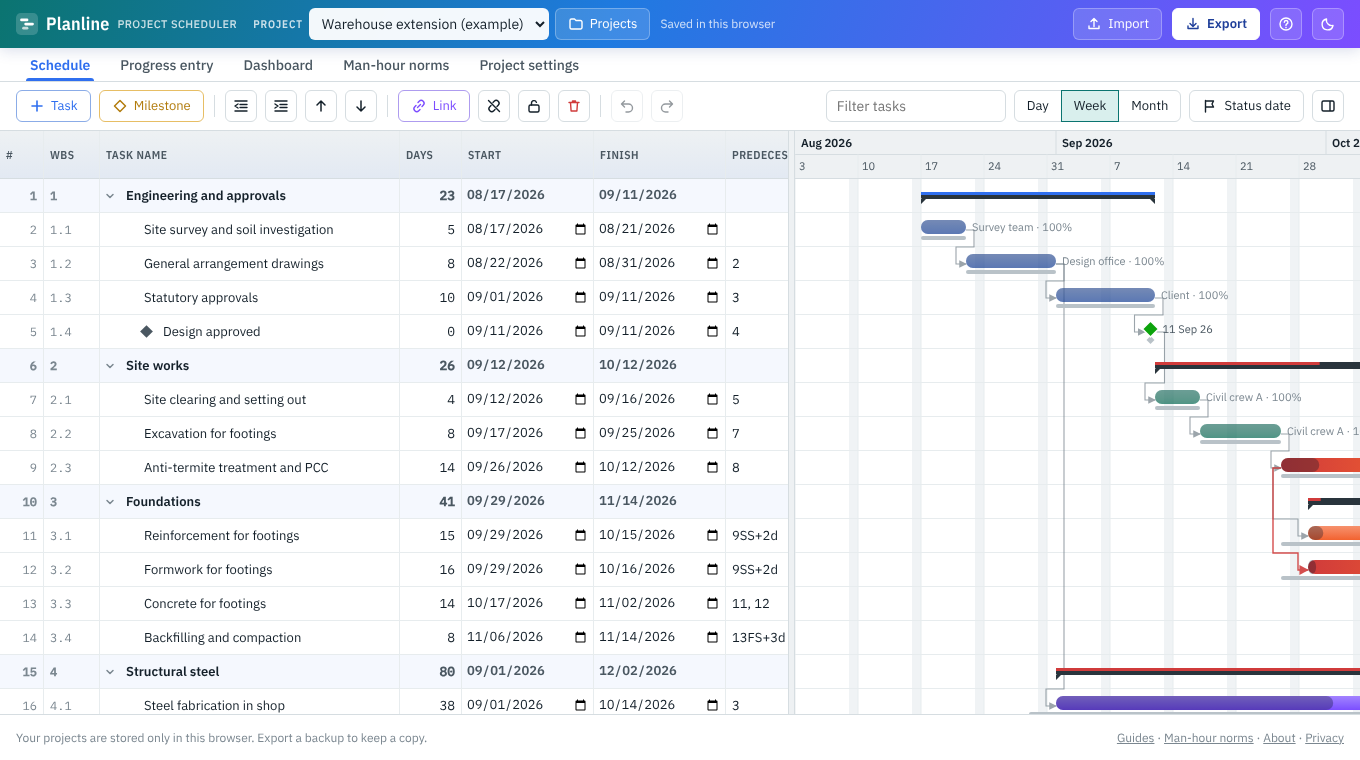
What the Gantt chart shows
- Task, summary and milestone bars with dependency arrows
- Critical path highlighted, with total float for every task
- Percent-complete fill and actual dates once work starts
- Baseline bars underneath, so slippage is visible at a glance
- Status date line and non-working days
- Day, week and month zoom
Why not just draw it in Excel?
A hand-drawn Excel Gantt chart has no logic: when one task slips, you recolour every cell after it. In Planline the bars are driven by links and durations, so a change ripples through the whole schedule instantly, and you can still export the result to Excel for people who live in spreadsheets.
Bring in an existing plan
Already have a task list? Import it from Excel or CSV in almost any layout. Planline matches the columns by name and works out the hierarchy from WBS codes, outline numbers, indentation or heading rows. MS Project XML and Primavera P6 .xer files work too.
Frequently asked questions
Do I need an account to make a Gantt chart?
No. Open the page and start. Your work is saved automatically in your browser.
Can I export the Gantt chart to Excel?
Yes. The Excel report includes a formatted Gantt chart drawn in cells, plus the schedule, critical path and a dashboard.
Does it support dependencies and lag?
Yes: finish-to-start, start-to-start, finish-to-finish and start-to-finish, each with a positive lag or a negative lead in days.
Will it work on a phone?
It works in any modern browser, but a laptop or tablet is far more comfortable for editing a schedule.
Try it on your own schedule
Planline is free, needs no sign-up and keeps your data in your browser. Start from the sample project or import your own file.